4G Module Usage Guide
The Quectel LTE Standard EM05 series is an LTE Cat 4 module designed for IoT/M2M applications. It uses a space-saving M.2 (NGFF) form factor, and its ultra-thin, compact design makes it easy to embed into small-sized products.
The EM05 series supports a maximum downlink rate of 150 Mbps and a maximum uplink rate of 50 Mbps, and includes three models: EM05-CN, EM05-E, and EM05-G. It supports multiple network standards including LTE-FDD, LTE-TDD, DC-HSDPA, HSPA+, HSDPA, HSUPA, WCDMA, and CDMA.
To use the EM-05 module on the Jetson series, you need to recompile the system kernel and flash the newly compiled system.
Method 1: Replace with a New Kernel
1.1 Pull the Pre-compiled Materials
1.2 Modify the Device Tree Configuration File
1.3 Move the Kernel and Drivers to the Designated Location
1.4 Apply the Changes and Reboot to Verify
Method 2: Compile and Flash a Complete System
2.1 Obtain the Source Code and Toolchain
- Install the build dependencies
sudo apt install build-essential bc git bison flex libssl-dev zip libncurses-dev make git- Create a directory for the toolchain
mkdir $HOME/l4t-gcc-toolchain
cd $HOME/l4t-gcc-toolchain- Download and extract the cross-compilation toolchain
wget https://developer.nvidia.com/downloads/embedded/l4t/r36_release_v3.0/toolchain/aarch64--glibc--stable-2022.08-1.tar.bz2
tar xf aarch64--glibc--stable-2022.08-1.tar.bz2- Enter the cached flashing firmware directory
cd $HOME/nvidia/nvidia_sdk/JetPack_6.2.1_Linux_JETSON_ORIN_NANO_TARGETS/Linux_for_Tegra/source # adjust to your actual directory- Pull the source code according to the release tag. Jetson Linux Archive | NVIDIA Developer
./source_sync.sh -k -t <release-tag> # replace <release-tag> with your release, e.g. jetson_36.4.32.2 Modify the Kernel Source Code
INFO
This section can refer to the Quectel Linux & Android Driver Technical Manual
Jetson Orin Nano configuration file path: arch/arm64/configs/defconfig
- To configure the USB-to-serial driver, add the following content
CONFIG_USB_SERIAL=y
CONFIG_USB_SERIAL_WWAN=y
CONFIG_USB_SERIAL_OPTION=y
CONFIG_USB_NET_DRIVERS=y
CONFIG_USB_USBNET=y
CONFIG_USB_NET_QMI_WWAN=y
CONFIG_USB_WDM=y- Modify
drivers/usb/serial/option.cto add the VID and PID to the USB-to-serial driver
static const struct usb_device_id option_ids[] = {
#if 1 // 2025-04-24 Added by Quectel
    { USB_DEVICE(0x2C7C, 0x0125) },
#endif
    ... ...
}- Use the USBNet driver, file path:
drivers/usb/serial/option.c
static int option_probe(struct usb_serial *serial,
            const struct usb_device_id *id)
{
    ... ...

#if 1  // 2025-04-24 Added by Quectel
    if (serial->dev->descriptor.idVendor == cpu_to_le16(0x2C7C)) {
         __u16 idProduct = le16_to_cpu(serial->dev->descriptor.idProduct);
         struct usb_interface_descriptor *intf = &serial->interface->cur_altsetting->desc;

         if (intf->bInterfaceClass != 0xFF || intf->bInterfaceSubClass == 0x42) {
              //ECM, RNDIS, NCM, MBIM, ACM, UAC, ADB
              return -ENODEV;
         }

         if ((idProduct&0xF000) == 0x0000) {
              //MDM interface 4 is QMI
              if (intf->bInterfaceNumber == 4 && intf->bNumEndpoints == 3
                  && intf->bInterfaceSubClass == 0xFF && intf->bInterfaceProtocol == 0xFF)
                  return -ENODEV;
         }
    }
#endif

    /* Store the device flags so we can use them during attach. */
    usb_set_serial_data(serial, (void *)device_flags);

    return 0;
}- Add the zero-packet mechanism, file path:
drivers/usb/serial/usb_wwan.c
static struct urb *usb_wwan_setup_urb(struct usb_serial_port *port,
               int endpoint,
               int dir, void *ctx, char *buf, int len,
               void (*callback) (struct urb *))
{
   ... ...
     usb_fill_bulk_urb(urb, serial->dev,
            usb_sndbulkpipe(serial->dev, endpoint) | dir,
            buf, len, callback, ctx);

#if 1   //2025-04-24 Added by Quectel for zero packet
     if (dir == USB_DIR_OUT) {
         struct usb_device_descriptor *desc = &serial->dev->descriptor;

         if (desc->idVendor == cpu_to_le16(0x2C7C))
         urb->transfer_flags |= URB_ZERO_PACKET;
     }
#endif
     return urb;
}- Add the Reset-resume mechanism (sleep/wake), file path:
drivers/usb/serial/option.c
static struct usb_serial_driver option_1port_device = {
     ... ...
#ifdef CONFIG_PM
     .suspend           = usb_wwan_suspend,
     .resume           = usb_wwan_resume,
#if 1  //2025-04-24 Added by Quectel
     .reset_resume   = usb_wwan_resume,
#endif
#endif
};- Add the QMI_WWAN driver
Quectel provides the QMI_WWAN driver source fileqmi_wwan_q.c. Copy it into thedrivers/net/usb/directory. Also modifydrivers/net/usb/Makefileso thatqmi_wwan_q.ccan be compiled
#Makefile
# must insert qmi_wwan_q.o before qmi_wwan.o
obj-${CONFIG_USB_NET_QMI_WWAN} += qmi_wwan_q.o
obj-${CONFIG_USB_NET_QMI_WWAN} += qmi_wwan.o
2.3 Compile the Kernel
INFO
This step may take more than half an hour
- Create the output directory
cd ../../
mkdir kernel_out- Compile and install the kernel
export CROSS_COMPILE=$HOME/l4t-gcc-toolchain/aarch64--glibc--stable-2022.08-1/bin/aarch64-buildroot-linux-gnu-     # set up the cross-compilation toolchain
make -C kernel                        # build the Jetson Linux kernel image
sudo -E make install -C kernel # install kernel modules and in-tree modules- Copy the kernel image to the flashing directory
cp kernel/kernel-jammy-src/arch/arm64/boot/Image ../Linux_for_Tegra/kernel/Image- Build the NVIDIA out-of-tree modules (drivers)
export CROSS_COMPILE=$HOME/l4t-gcc-toolchain/aarch64--glibc--stable-2022.08-1/bin/aarch64-buildroot-linux-gnu-
export KERNEL_HEADERS=$PWD/kernel/kernel-jammy-src
make modules- Install into the flashing directory
export INSTALL_MOD_PATH=$HOME/nvidia/nvidia_sdk/JetPack_6.2.1_Linux_JETSON_ORIN_NANO_TARGETS/Linux_for_Tegra/rootfs/ # adjust to your actual directory
sudo -E make modules_install- Start building the DTB
export CROSS_COMPILE=$HOME/l4t-gcc-toolchain/aarch64--glibc--stable-2022.08-1/bin/aarch64-buildroot-linux-gnu-
export KERNEL_HEADERS=$PWD/kernel/kernel-jammy-src
make dtbs- Copy the generated dtb files to the flashing directory
cp kernel-devicetree/generic-dts/dtbs/* ../kernel/dtb/2.4 Flash the System
- Enter the cached flashing firmware directory
cd $HOME/nvidia/nvidia_sdk/JetPack_6.2.1_Linux_JETSON_ORIN_NANO_TARGETS/Linux_for_Tegra/source # adjust to your actual directoryFlash via the command line:
- Super mode
sudo ./tools/kernel_flash/l4t_initrd_flash.sh --external-device nvme0n1p1 -c tools/kernel_flash/flash_l4t_t234_nvme.xml -p "-c bootloader/generic/cfg/flash_t234_qspi.xml" --showlogs --network usb0 jetson-orin-nano-devkit-super internal- Normal mode
sudo ./flash.sh jetson-orin-nano-devkit-nvme internal2.5 Boot and Verify
- Upload Quectel_QConnectmanager to the development board
- Extract and compile
unzip Quectel_QConnectManager_Linux_V1.6.5.zip
cd Quectel_QConnectManager_Linux_V1.6.5
make
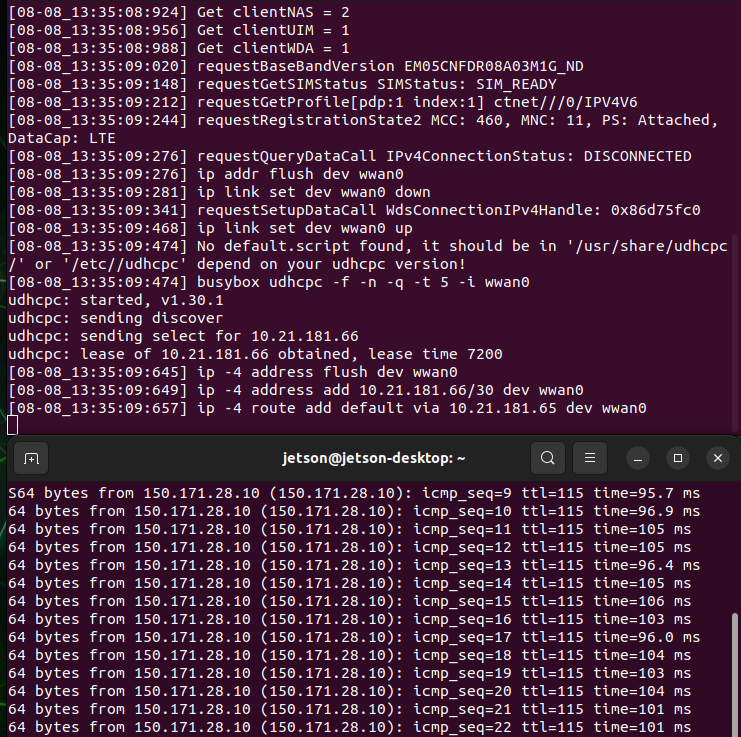
Once it runs successfully, you can dial up and access the internet over 4G
jetson@jetson-desktop:~/Downloads/Quectel_QConnectManager_Linux_V1.6.5$ sudo ./quectel-CM
[08-08_11:39:04:415] QConnectManager_Linux_V1.6.5
[08-08_11:39:04:416] Find /sys/bus/usb/devices/1-2.2 idVendor=0x2c7c idProduct=0x125, bus=0x001, dev=0x007
[08-08_11:39:04:416] Auto find qmichannel = /dev/cdc-wdm0
[08-08_11:39:04:417] Auto find usbnet_adapter = wwan0
[08-08_11:39:04:417] netcard driver = qmi_wwan_q, driver version = V1.2.6
[08-08_11:39:04:417] Modem works in QMI mode
[08-08_11:39:04:447] cdc_wdm_fd = 7
[08-08_11:39:04:523] Get clientWDS = 5
[08-08_11:39:04:557] Get clientDMS = 1
[08-08_11:39:04:589] Get clientNAS = 2
[08-08_11:39:04:620] Get clientUIM = 1
[08-08_11:39:04:653] Get clientWDA = 1
[08-08_11:39:04:684] requestBaseBandVersion EM05CNFDR08A03M1G_ND
[08-08_11:39:04:812] requestGetSIMStatus SIMStatus: SIM_READY
[08-08_11:39:04:876] requestGetProfile[pdp:1 index:1] ctnet///0/IPV4V6
[08-08_11:39:04:908] requestRegistrationState2 MCC: 460, MNC: 11, PS: Attached, DataCap: LTE
[08-08_11:39:04:940] requestQueryDataCall IPv4ConnectionStatus: DISCONNECTED
[08-08_11:39:04:941] ip addr flush dev wwan0
[08-08_11:39:04:947] ip link set dev wwan0 down
[08-08_11:39:05:003] requestSetupDataCall WdsConnectionIPv4Handle: 0x8723e530
[08-08_11:39:05:132] ip link set dev wwan0 up
[08-08_11:39:05:141] No default.script found, it should be in '/usr/share/udhcpc/' or '/etc//udhcpc' depend on your udhcpc version!
[08-08_11:39:05:142] busybox udhcpc -f -n -q -t 5 -i wwan0
udhcpc: started, v1.30.1
udhcpc: sending discover
udhcpc: sending select for 10.21.181.66
udhcpc: lease of 10.21.181.66 obtained, lease time 7200
[08-08_11:39:05:282] ip -4 address flush dev wwan0
[08-08_11:39:05:286] ip -4 address add 10.21.181.66/30 dev wwan0
[08-08_11:39:05:292] ip -4 route add default via 10.21.181.65 dev wwan0
Check the network interface information
jetson@jetson-desktop:~$ ifconfig wwan0
wwan0: flags=193<UP,RUNNING,NOARP>  mtu 1500
        inet 10.21.181.66  netmask 255.255.255.252
        inet6 fe80::5804:41ff:feda:ce83  prefixlen 64  scopeid 0x20<link>
        ether 5a:04:41:da:ce:83  txqueuelen 1000  (Ethernet)
        RX packets 9  bytes 2304 (2.3 KB)
        RX errors 0  dropped 0  overruns 0  frame 0
        TX packets 22  bytes 1854 (1.8 KB)
        TX errors 0  dropped 0 overruns 0  carrier 0  collisions 0
Connectivity test