
Accelerating with TensorRT
TensorRT is NVIDIA's high-performance inference engine. Through operator fusion, precision quantization (FP16/INT8) and kernel auto-tuning, it significantly speeds up model inference on the GPU. On Jetson, TensorRT ships preinstalled with JetPack — no separate installation needed — and is the standard deployment path.
The typical pipeline is: training framework (PyTorch etc.) → export ONNX → build a TensorRT engine (.engine) → load the engine from C++ or Python.
TIP
The examples below target JetPack 6.2.x (TensorRT 10.x). TensorRT 10 removed legacy APIs such as enqueueV2 / execute_async_v2; all examples here use the new API.
1. Check the Environment
# TensorRT version
dpkg -l | grep tensorrt

# trtexec location (CLI conversion/benchmark tool)
ls /usr/src/tensorrt/bin/trtexec
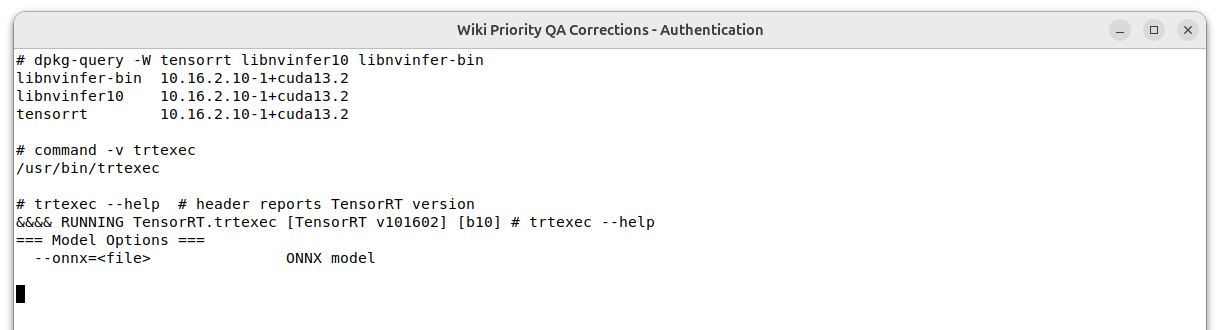
Example from a real Jetson environment (JetPack 7.2.1 / TensorRT 10.16):
2. Quick Conversion and Benchmarking with trtexec
trtexec is the bundled CLI tool for quickly verifying that a model converts and measuring latency — no code required.
2.1 Export ONNX
With PyTorch / Ultralytics (installation: PyTorch tutorial):
yolo export model=yolo11s.pt format=onnx imgsz=6402.2 Build the Engine and Benchmark
# Build an FP16 engine
/usr/src/tensorrt/bin/trtexec --onnx=yolo11s.onnx --saveEngine=yolo11s_fp16.engine --fp16

# Benchmark only (load the engine, run 200 iterations)
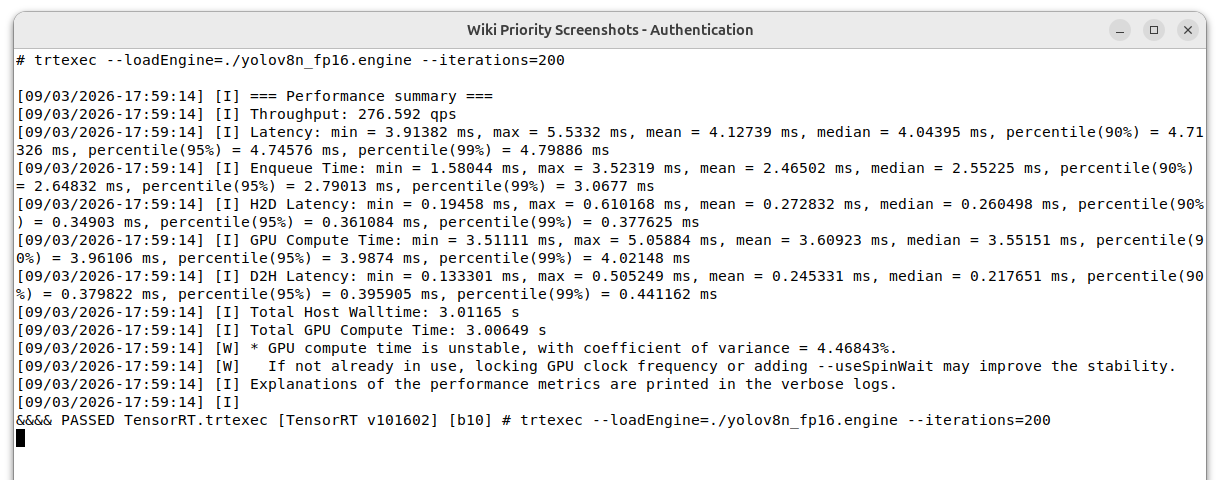
/usr/src/tensorrt/bin/trtexec --loadEngine=yolo11s_fp16.engine --iterations=200 --avgRuns=100
The following summary was measured on an Orin Nano Super in 25W mode with an existing YOLOv8n FP16 engine over 200 iterations. Results from different models, input sizes, power modes, and TensorRT releases are not directly comparable.
Common options:
| Option | Description |
|---|---|
--fp16 | Enable FP16 (biggest win on Jetson, virtually no accuracy loss) |
--int8 | Enable INT8 (requires calibration data; some accuracy loss) |
--minShapes / --optShapes / --maxShapes | For dynamic input shapes |
--verbose | Detailed build logs — useful when conversion fails |
Ultralytics can also export a TensorRT engine in one line:
yolo export model=yolo11s.pt format=engine half=True device=0. Then simply replaceYOLO("yolo11s.pt")withYOLO("yolo11s.engine")in the YOLO inference example.
3. Python Bindings
3.1 Installation
# TensorRT Python bindings (JetPack repo)
sudo apt install python3-libnvinfer python3-libnvinfer-dev

# pycuda for device memory copies
pip install pycuda
Verify:
python3 -c "import tensorrt; print(tensorrt.__version__)"3.2 Load the Engine and Run Inference
Complete example (tensor names and shapes depend on your model — query them with trtexec --loadEngine=... --verbose or the print loop below):
import numpy as np
import tensorrt as trt
import pycuda.driver as cuda
import pycuda.autoinit  # initialize the CUDA context

ENGINE_PATH = "yolo11s_fp16.engine"

# 1. Deserialize the engine
logger = trt.Logger(trt.Logger.WARNING)
with open(ENGINE_PATH, "rb") as f, trt.Runtime(logger) as runtime:
    engine = runtime.deserialize_cuda_engine(f.read())
context = engine.create_execution_context()

# 2. List input/output tensor names
for i in range(engine.num_io_tensors):
    name = engine.get_tensor_name(i)
    print(name, engine.get_tensor_mode(name), engine.get_tensor_shape(name))

# 3. Prepare input/output buffers (example: 1x3x640x640 input)
inp_name = engine.get_tensor_name(0)          # e.g. "images"
out_name = engine.get_tensor_name(1)          # e.g. "output0"
inp = np.random.rand(1, 3, 640, 640).astype(np.float32)
context.set_input_shape(inp_name, inp.shape)  # required for dynamic shapes
out_shape = tuple(context.get_tensor_shape(out_name))
out = np.empty(out_shape, dtype=np.float32)

d_in = cuda.mem_alloc(inp.nbytes)
d_out = cuda.mem_alloc(out.nbytes)
stream = cuda.Stream()

context.set_tensor_address(inp_name, int(d_in))
context.set_tensor_address(out_name, int(d_out))

# 4. Run inference
cuda.memcpy_htod_async(d_in, inp, stream)     # host -> device
context.execute_async_v3(stream.handle)       # async execution
cuda.memcpy_dtoh_async(out, d_out, stream)    # device -> host
stream.synchronize()

print(out.shape, out.flatten()[:5])
4. C++
4.1 Inference Example infer.cpp
#include <NvInfer.h>
#include <cuda_runtime.h>
#include <fstream>
#include <iostream>
#include <vector>

class Logger : public nvinfer1::ILogger {
    void log(Severity s, const char* msg) noexcept override {
        if (s <= Severity::kWARNING) std::cout << msg << std::endl;
    }
} gLogger;

int main(int argc, char** argv) {
    if (argc < 2) { std::cerr << "usage: " << argv[0] << " model.engine\n"; return 1; }

    // 1. Read and deserialize the engine
    std::ifstream file(argv[1], std::ios::binary | std::ios::ate);
    std::streamsize size = file.tellg();
    file.seekg(0);
    std::vector<char> blob(size);
    file.read(blob.data(), size);

    nvinfer1::IRuntime* runtime = nvinfer1::createInferRuntime(gLogger);
    nvinfer1::ICudaEngine* engine = runtime->deserializeCudaEngine(blob.data(), size);
    nvinfer1::IExecutionContext* ctx = engine->createExecutionContext();

    // 2. Get input/output tensor names
    const char* inpName = engine->getIOTensorName(0);
    const char* outName = engine->getIOTensorName(1);

    // 3. Set input shape and allocate device memory (example: 1x3x640x640)
    ctx->setInputShape(inpName, nvinfer1::Dims4{1, 3, 640, 640});
    auto outDims = ctx->getTensorShape(outName);

    size_t inpBytes = 1 * 3 * 640 * 640 * sizeof(float);
    size_t outCount = 1;
    for (int i = 0; i < outDims.nbDims; i++) outCount *= outDims.d[i];
    size_t outBytes = outCount * sizeof(float);

    void *dIn, *dOut;
    cudaMalloc(&dIn, inpBytes);
    cudaMalloc(&dOut, outBytes);
    ctx->setTensorAddress(inpName, dIn);
    ctx->setTensorAddress(outName, dOut);

    // 4. Copy input, execute, fetch output
    std::vector<float> inp(inpBytes / sizeof(float), 0.5f);
    std::vector<float> out(outCount);
    cudaStream_t stream;
    cudaStreamCreate(&stream);

    cudaMemcpyAsync(dIn, inp.data(), inpBytes, cudaMemcpyHostToDevice, stream);
    ctx->enqueueV3(stream);
    cudaMemcpyAsync(out.data(), dOut, outBytes, cudaMemcpyDeviceToHost, stream);
    cudaStreamSynchronize(stream);

    std::cout << "output[0..4]: ";
    for (int i = 0; i < 5; i++) std::cout << out[i] << " ";
    std::cout << std::endl;

    cudaStreamDestroy(stream);
    cudaFree(dIn); cudaFree(dOut);
    delete ctx; delete engine; delete runtime;
    return 0;
}
4.2 Build
CMakeLists.txt:
cmake_minimum_required(VERSION 3.16)
project(trt_infer CXX)
find_package(CUDA REQUIRED)
add_executable(infer infer.cpp)
target_include_directories(infer PRIVATE ${CUDA_INCLUDE_DIRS} /usr/include/aarch64-linux-gnu)
target_link_libraries(infer nvinfer cudart)mkdir build && cd build
cmake .. && make
./infer ../yolo11s_fp16.engine5. Troubleshooting
enqueueV2/execute_asyncnot found: TensorRT 10 removed the legacy APIs. Useset_tensor_address + execute_async_v3(Python) orsetTensorAddress + enqueueV3(C++).- Engines are not portable across devices/versions: an
.engineis tied to the GPU architecture and TensorRT version. Rebuild it after switching modules or upgrading JetPack. - Build failures — check the operators first: run
trtexec --onnx=... --verboseto find the unsupported operator, then simplify the model or write a plugin. - First inference is slow: the first run includes memory allocation and warm-up; discard the first few frames when benchmarking (
trtexecwarms up by default).