
FAQ & Troubleshooting
This page collects common issues for Jetson Orin Nano / NX and the C1901, C1902, and C2401. Before running commands that modify the system, confirm the carrier-board model and revision, JetPack version, module SKU, and boot device.
Collect system information first
Attach the output below and photos of the failure when requesting support. Redact serial numbers, usernames, and IP addresses if needed.
cat /etc/nv_tegra_release
uname -a
cat /proc/device-tree/model
cat /proc/device-tree/compatible | tr '\0' '\n'
cat /proc/cmdline
lsblk -o NAME,SIZE,TYPE,FSTYPE,MOUNTPOINTS
lsusb
lsusb -t
ip -br link
sudo dmesg -T | tail -n 200
Flashing and boot
SDK Manager cannot detect the Jetson
Run on the Ubuntu host:
lsusb | grep 0955No output means the host has not detected an NVIDIA Recovery device. Check that the Type-C cable carries data, enter Force Recovery using the pins documented for the board, connect without a hub, and assign the re-enumerated NVIDIA USB device to the Ubuntu VM. If 0955 appears, restart SDK Manager and confirm that the selected JetPack supports the module. See the flashing guide.
Flashing disconnects or stalls
The Recovery device re-enumerates while flashing. VMware must reconnect it to the Ubuntu guest. Also verify host disk space, network access, and the flash log. Never remove power while data is being written.
Flash succeeds but the board does not boot or display video
Disconnect optional USB devices, cameras, and expansion boards. Keep only power, display, and the boot device. Check power input and polarity, capture the complete UART DEBUG log, and restore the original DTB if the failure started after a device-tree change.
SUPER / MAXN modes are missing
cat /etc/nv_tegra_release
sudo nvpmodel -q --verbose
SUPER support depends on the L4T release, module, carrier board, and flashed configuration; it cannot be enabled only from the desktop menu. Use the matching board flashing guide and check the product comparison.
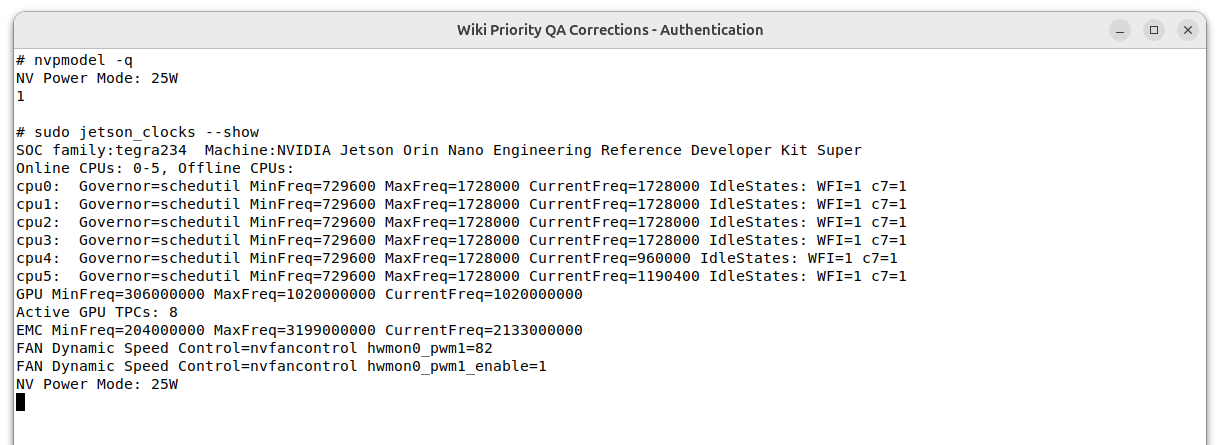
Example from an Orin Nano Super running JetPack 7.2.1 in 25W mode:
JetPack 7 ISO has no Install option
The device firmware must meet the ISO installer requirement. Upgrade older firmware through JetPack 6.x first; see JetPack 7 FAQ.
Storage, USB, and device tree
NVMe SSD is not detected
lsblk
sudo lspci -nn
sudo dmesg -T | grep -iE 'nvme|pcie'
Power off and reseat the SSD, then check slot, length, and single-/double-sided restrictions. If the controller appears but logs link or timeout errors, retain dmesg and cross-test with a validated SSD and power supply.
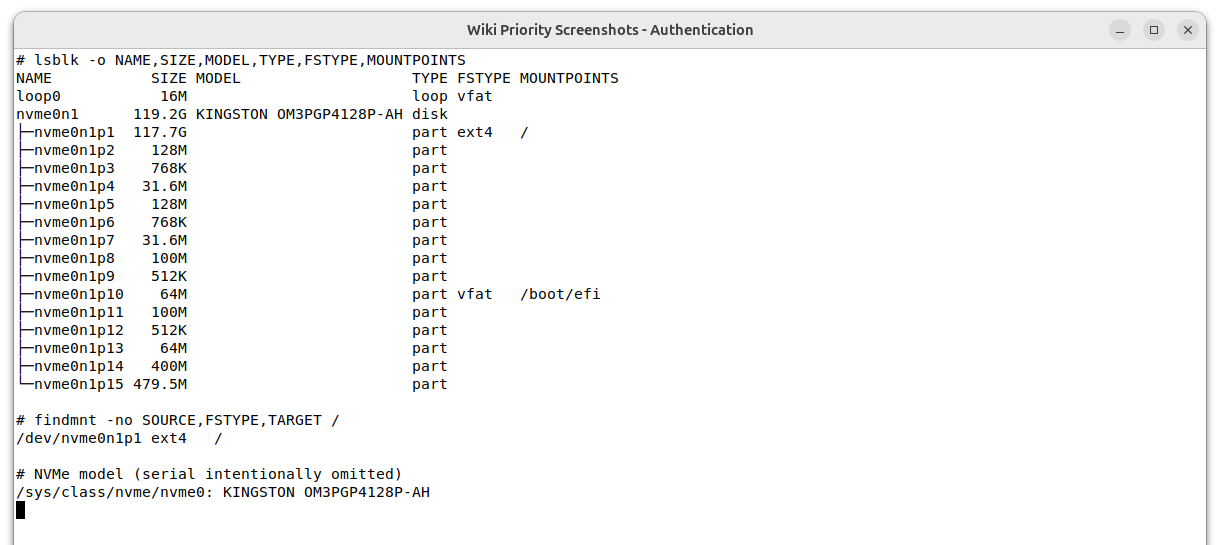
The following real-device example verifies the NVMe model, partition layout, and root filesystem location without exposing the drive serial number:
A USB device runs only at USB 2.0 speed
lsusb -t
sudo dmesg -T | grep -iE 'usb|xhci'
480M is USB 2.0; 5000M/10000M is SuperSpeed. After excluding the cable, hub, and device, some C1901/C1902 or C2401 expansion ports require a matching device tree. See USB Configuration.
How do I identify the active device tree?
tr -d '\0' </proc/device-tree/nvidia,dtsfilename 2>/dev/null || true
grep -nE '^[[:space:]]*(FDT|OVERLAYS)' /boot/extlinux/extlinux.conf
find /boot -maxdepth 2 \( -name '*.dtb' -o -name '*.dtbo' \) -print
A file under /boot is not necessarily active. Check the boot configuration and runtime tree together. See Pinmux & Device Tree.
The system no longer boots after replacing a DTB
Do not overwrite more files. Boot the preserved known-good menu entry and restore the original files. If no entry works, enter Recovery and flash the matching BSP. Always back up the DTB and extlinux.conf before editing.
Can an old DTB be reused after a JetPack upgrade?
It is not recommended. A DTB is tied to L4T/BSP, module SKU, and carrier-board revision. Rebase the changes on the target release source or obtain board files built for that release.
Network and remote access
SSH cannot connect
ip -br address
systemctl status ssh --no-pager
ss -lntp | grep ':22'
Check reachability, username, and that SSH is listening. The Type-C virtual interface commonly uses 192.168.55.1, but USB Device mode must be working. See Connect to Jetson.
A network adapter is missing
lspci -nnk
ip -br link
sudo dmesg -T | grep -iE 'ethernet|r8125|iwlwifi|firmware'
Select the driver from the PCI ID, not only the retail adapter name. See Network Card Driver.
GPIO, UART, CAN, and camera
/sys/class/gpio is unavailable on JetPack 6
JetPack 6 uses libgpiod. Confirm the pinmux first, then run:
sudo apt install gpiod
gpioinfo
See GPIO Control and 40-pin Header Configuration.
SPI, PWM, or UART nodes are missing
The pins may still be GPIO or another SFIO function. Use Jetson-IO for 40-pin development; production settings should be generated by the pinmux spreadsheet and flashed with the BSP. C2401 uses a 30-pin connector and must not use the 40-pin configuration unchanged.
CAN does not communicate or enters BUS-OFF
ip -details -statistics link show can0Match bitrate, CAN_H/CAN_L, common ground, and termination. C1901/C1902 expose TX/RX and require an external transceiver; C2401 includes one and can switch in a 120-ohm terminator. See CAN Bus.
A CSI camera has no image
Reconnect the FPC with power removed, confirm orientation and driver support, then inspect:
v4l2-ctl --list-devices
sudo dmesg -T | grep -iE 'camera|tegra-capture|vi5|csi'
No /dev/video* usually indicates probe, power, device-tree, or driver failure rather than a player issue. See Camera.
AI software
CUDA commands are missing
cat /etc/nv_tegra_release
dpkg -l | grep -E 'cuda|nvidia-jetpack'
JetPack/L4T maps to specific CUDA releases. Do not use generic x86 Ubuntu instructions. See Install CUDA.
A TensorRT engine fails after moving or upgrading
An engine is tied to the TensorRT version, GPU architecture, and build settings. Rebuild it from ONNX after changing module or JetPack. See TensorRT FAQ.
Requesting support
Provide the carrier board and revision, module SKU, JetPack/L4T, boot device, power supply, reproduction steps, system-information output, and UART or dmesg logs. For device-tree issues, include the active DTB/DTBO names and the source of the modifications.